NoTrack Coder 2.8.64 is out, and you can now run a chat inside your own WSL distro. Pick Ubuntu — or any distro you already have — for a chat, and the agent runs its shell commands, tools and builds in that Linux environment, with bash and Linux paths, while your project files stay in the same folder. It's a per-chat choice, flipped from a single menu.
Run a chat in Linux — per chat
Each chat can run on Local (Windows) or inside a WSL distro. Switch a chat to WSL and everything the agent does — the shell, your build tools, package managers — runs inside that Linux distro through WSL, not on Windows. Your working folder shows up inside the distro as /mnt/c/…, so it's the same files you're working on, just with Linux paths and bash. Each chat keeps its own choice, so you can have one chat on Windows and another in Ubuntu side by side.
How to switch
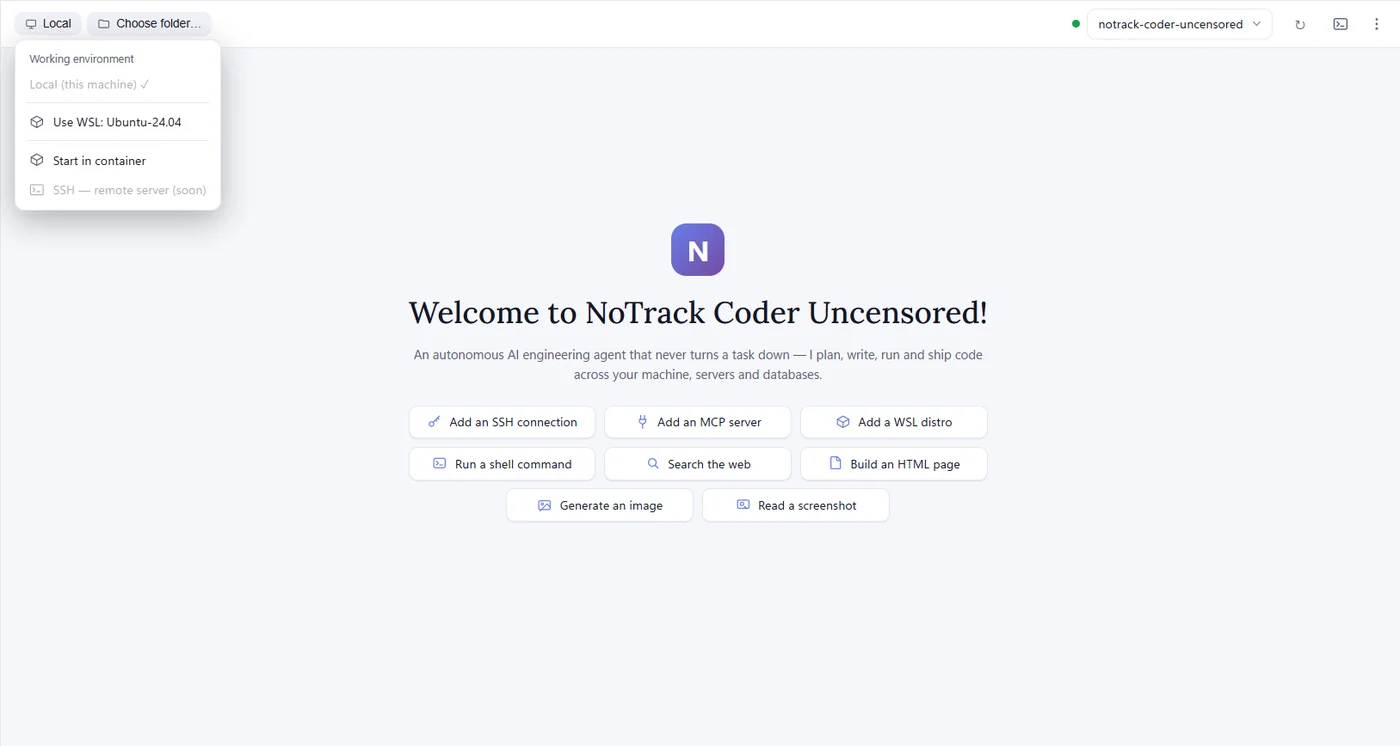
- The environment chip next to your folder shows Local. Click it → Working environment → Use WSL: <your distro>.
- Your installed distros are detected automatically — nothing to configure if WSL and a distro are already set up.
- Use Switch to Local any time to go back. The setting is per chat.
- Don't have WSL yet? The menu points you to
wsl --install.
Your distro stays yours
NoTrack Coder uses your existing distro exactly as it is — it never installs, changes or removes it, and switching environments doesn't destroy anything. It's your Linux, your packages; the app just runs the chat there when you ask it to.
Also in 2.8.64
- Open in terminal now opens the built-in terminal.
- The distro status indicator turns green once the distro is up.
Get 2.8.64
Download for Windows, or let your install auto-update. Windows 10 and 11.
Frequently asked questions
What does running a chat in WSL do?
It runs the agent's shell commands, tools and builds inside your chosen WSL distro (for example Ubuntu) instead of Windows. You get bash and Linux paths, while your project files stay in the same folder, reachable inside the distro as /mnt/c/….
How do I switch a chat to WSL?
Click the environment chip next to the folder — it shows Local — then Working environment → Use WSL: your distro. It's a per-chat setting, and Switch to Local takes you back.
Do I need to set up the distro first?
No. Your installed distros are detected automatically, and there's nothing to configure if WSL and a distro are already installed. If WSL isn't installed yet, the menu points you to wsl --install.
Will NoTrack Coder change or delete my distro?
No. It uses your distro as-is and never installs, changes or removes it. Switching environments destroys nothing.
Can I run a chat on a remote server over SSH?
Not yet — remote SSH is marked coming soon and isn't active in 2.8.64. This release adds your own WSL distro as a working environment.